How to get out of QA mode?
Autor wątku: John Fry
John Fry
John Fry  Identity Verified
USA
Local time: 03:04
japoński > angielski
+ ...
Jul 26

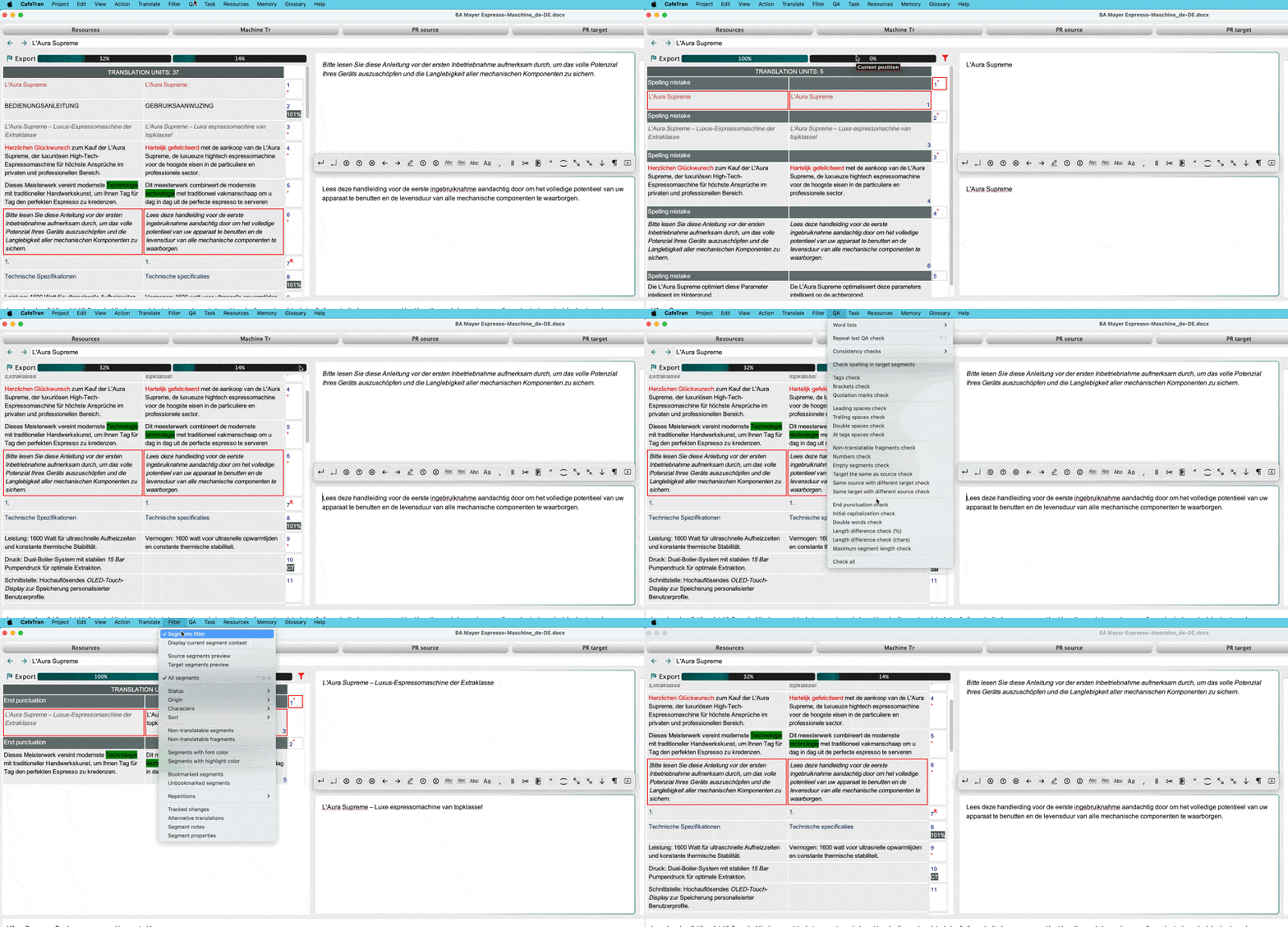
When I run QA, the grid view (source on left, target on right) switches to a "QA mode" where the header says "TRANSLATION UNITS: 5" (or whatever number) and only the segments that have QA issues are shown. When I'm done with QA, how do I return back to the original grid showing all the segments? Unable to escape from this "QA mode", I've been quitting CafeTran and restarting it, which obviously is not ideal.

Taran Johnston
 
CafeTran Trainer
CafeTran Trainer
Holandia
Członek ProZ.com
od 2006

niemiecki > niderlandzki
+ ...
Filter menu Jul 27

From the Wiki:

Filter - Segments filter = Toggle the usage of the segments filter, which enables displaying only the segment pairs matching the criteria below. Can also be done via the dedicated shortcut and the Filter icon in the Segments grid.

Image-003246

[Edited at 2026-07-27 05:54 GMT]


To report site rules violations or get help, contact a site moderator:

Moderatorzy tego forum
Natalie[Call to this topic]

You can also contact site staff by submitting a support request »

How to get out of QA mode?


TM-Town
Manage your TMs and Terms ... and boost your translation business

Are you ready for something fresh in the industry? TM-Town is a unique new site for you -- the freelance translator -- to store, manage and share translation memories (TMs) and glossaries...and potentially meet new clients on the basis of your prior work.

More info »
Draftsmith
Edit Translations Faster With Affordable AI You Can Trust

Draftsmith is an affordable AI editing tool for busy translators. It works directly in Microsoft Word, supporting the way you work ProZ members receive a 20% discount on a single user subscription of Draftsmith.

More info »