This site uses cookies.
Some of these cookies are essential to the operation of the site,
while others help to improve your experience by providing insights into how the site is being used.
For more information, please see the ProZ.com privacy policy.
Cilian O'Tuama Niemcy Local time: 03:48 niemiecki > angielski + ...
Jul 17
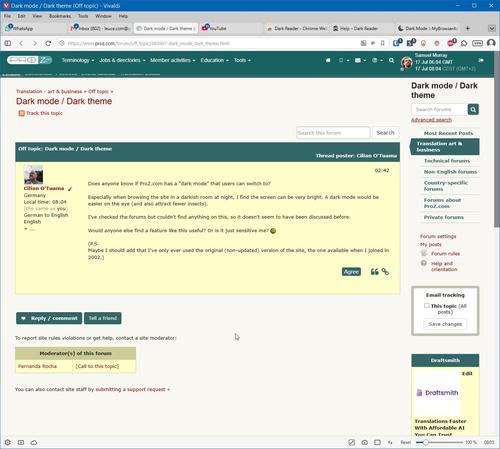
Does anyone know if ProZ.com has a “dark mode” that users can switch to?
Especially when browsing the site in a darkish room at night, I find the screen can be very bright. A dark mode would be easier on the eye (and also attract fewer insects).
I've checked the forums but couldn't find anything on this, so it doesn't seem to have been discussed before.
Would anyone else find a feature like this useful? Or is it just sensitive me? ... See more
Does anyone know if ProZ.com has a “dark mode” that users can switch to?
Especially when browsing the site in a darkish room at night, I find the screen can be very bright. A dark mode would be easier on the eye (and also attract fewer insects).
I've checked the forums but couldn't find anything on this, so it doesn't seem to have been discussed before.
Would anyone else find a feature like this useful? Or is it just sensitive me?
(P.S.
Maybe I should add that I've only ever used the original (non-updated) version of the site, the one available when I joined in 2002.) ▲ Collapse
Subject:
Comment:
The contents of this post will automatically be included in the ticket generated. Please add any additional comments or explanation (optional)
Samuel Murray Holandia Local time: 03:48 Członek ProZ.com od 2006 angielski > afrikaans + ...
Browser extensions
Jul 17
Cilian O'Tuama wrote:
Does anyone know if ProZ.com has a “dark mode” that users can switch to?
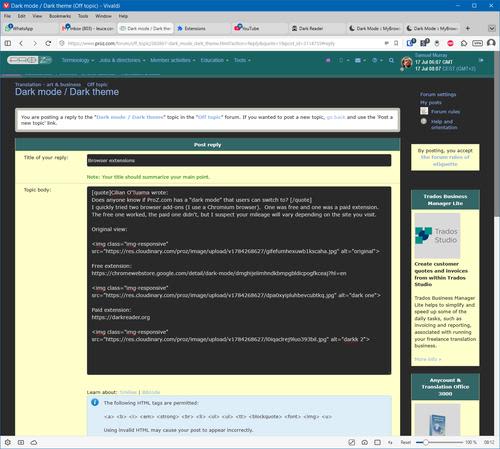
I quickly tried a browser add-on (I use a Chromium browser).
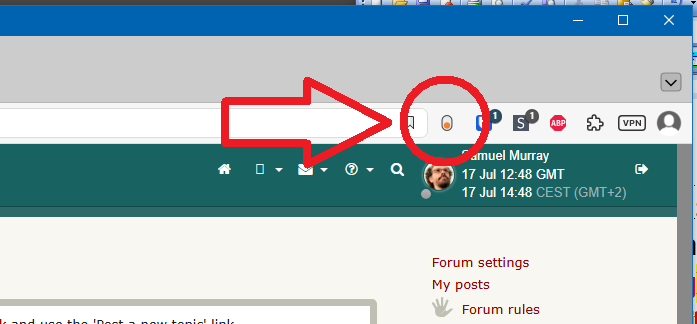
Right-click the add-on's icon to access a myriad of settings.
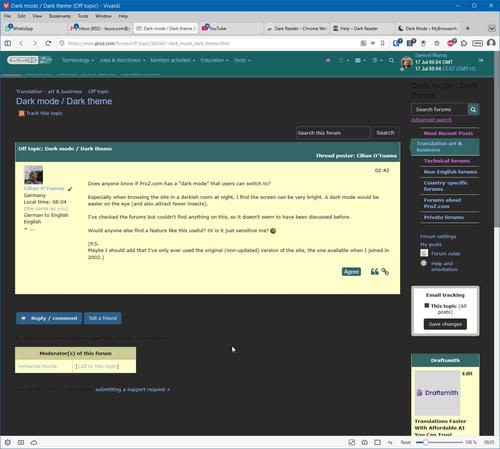
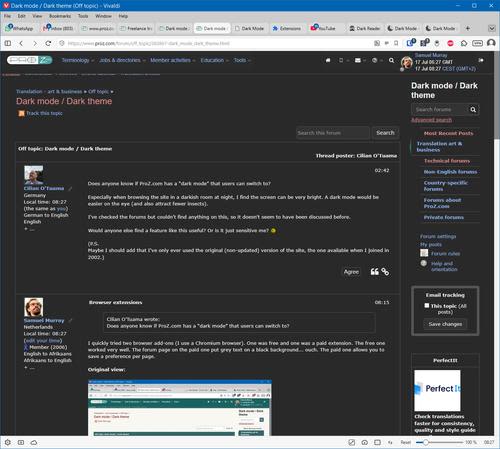
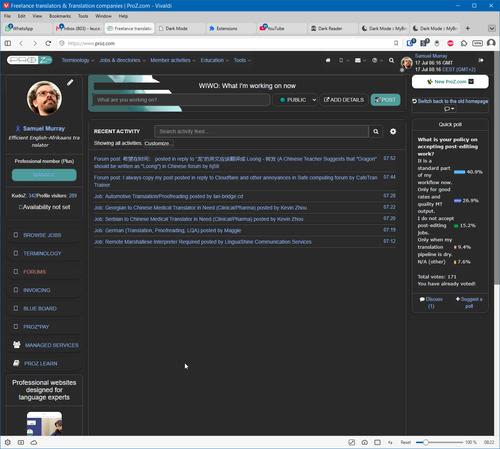
Original view:
Darkened view:
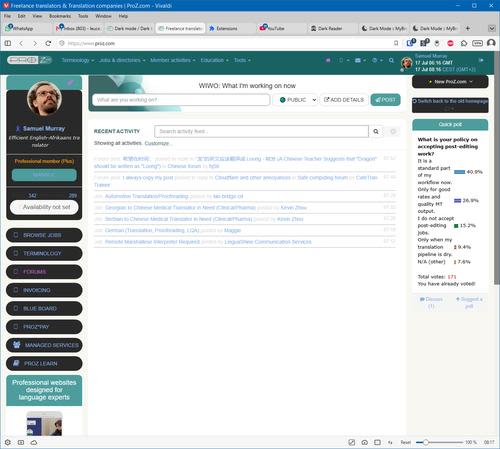
With default settings:
[Edited at 2026-07-17 06:36 GMT]
Daryo
Subject:
Comment:
The contents of this post will automatically be included in the ticket generated. Please add any additional comments or explanation (optional)
Samuel Murray Holandia Local time: 03:48 Członek ProZ.com od 2006 angielski > afrikaans + ...
Tweaked
Jul 17
The default view is called "native mode" but it doesn't affect the new ProZ.com mobile-friendly home screen. When I deselect "native mode" and tried "simple dark 1" mode, things get better.
[Edited at 2026-07-17 06:43 GMT]
Daryo
Maria Laura Curzi
Subject:
Comment:
The contents of this post will automatically be included in the ticket generated. Please add any additional comments or explanation (optional)
Cilian O'Tuama Niemcy Local time: 03:48 niemiecki > angielski + ...
NOWY TEMAT
Thanks Samuel
Jul 17
I was just thinking it'd be useful to have a button on ProZ pages to instantly switch back and forth between daytime and nighttime modes, rather than setting my browsers to show everything either dark or bright.
Sorry for not making that clear.
Maybe others are less sensitive. I just prefer dim lighting, as long as the text is legible. My screen doesn't need to dazzle me and light up the room I'm in.
Subject:
Comment:
The contents of this post will automatically be included in the ticket generated. Please add any additional comments or explanation (optional)
Samuel Murray Holandia Local time: 03:48 Członek ProZ.com od 2006 angielski > afrikaans + ...
Include list
Jul 17
Cilian O'Tuama wrote:
I was just thinking it'd be useful to have a button on ProZ pages to instantly switch back and forth between daytime and nighttime modes, rather than setting my browsers to show everything either dark or bright.
In the add-on, if you enable "Include list", and specify "proz.com", then only ProZ.com is darkened.
Subject:
Comment:
The contents of this post will automatically be included in the ticket generated. Please add any additional comments or explanation (optional)
Cilian O'Tuama Niemcy Local time: 03:48 niemiecki > angielski + ...
NOWY TEMAT
Yeah, but
Jul 17
Samuel Murray wrote:
In the add-on, if you enable "Include list", and specify "proz.com", then only ProZ.com is darkened.
Yeah, but then I have to reset it via browser during the daytime, when the brightness is okay. A button on ProZ would be simpler.
Subject:
Comment:
The contents of this post will automatically be included in the ticket generated. Please add any additional comments or explanation (optional)
Samuel Murray Holandia Local time: 03:48 Członek ProZ.com od 2006 angielski > afrikaans + ...
Okay, no problem
Jul 17
Cilian O'Tuama wrote:
Samuel Murray wrote:
In the add-on, if you enable "Include list", and specify "proz.com", then only ProZ.com is darkened.
Yeah, but then I have to reset it via browser during the daytime, when the brightness is okay. A button on ProZ would be simpler.
Okay, no problem.
For me personally, pressing a button on the ProZ.com website is just as easy as pressing a button in the browser's add-on pane.
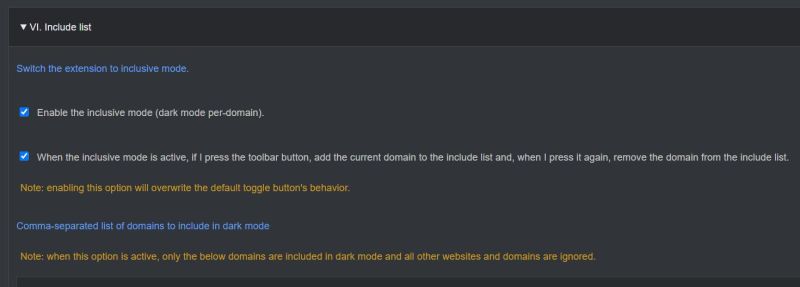
The add-on's relevant settings are:
With these two items checked, ProZ.com is permanently in light mode until I click the button. Then ProZ.com is permanently in dark mode again until I click the button. And so on.
[Edited at 2026-07-17 12:57 GMT]
Subject:
Comment:
The contents of this post will automatically be included in the ticket generated. Please add any additional comments or explanation (optional)
Cilian O'Tuama Niemcy Local time: 03:48 niemiecki > angielski + ...
NOWY TEMAT
Thanks again.
00:49
Maybe I should look into add-on panes - never even heard of them. Am obviously old already, or getting there.
Though I'd still prefer a button on Proz to switch from light to dark
Subject:
Comment:
The contents of this post will automatically be included in the ticket generated. Please add any additional comments or explanation (optional)
The underlying LLM technology of LinguaCore offers AI translations of unprecedented quality. Quick and simple. Add a human linguistic review at the end for expert-level quality at a fraction of the cost and time.
Pastey is an innovative desktop application that bridges the gap between human expertise and artificial intelligence. With intuitive keyboard shortcuts, Pastey transforms your source text into AI-powered draft translations.