Using LLMs Directly in Trados Studio: A Plugin Worth Exploring Autor wątku: Mohamed Zeid
|
|---|
Mohamed Zeid 
USA
Local time: 06:48
angielski > arabski
+ ...
I wanted to share a tool that I think may be of interest to translators who have been experimenting with LLMs in their workflow.
It's called TransLLM, and it's a plugin for Trados Studio that lets you connect Trados directly to LLMs. What I found particularly interesting is that it can work with local models through LM Studio or Ollama, so it is possible to translate without sending the actual translation content to a cloud service.
It can also connect to cloud-based mo... See more I wanted to share a tool that I think may be of interest to translators who have been experimenting with LLMs in their workflow.
It's called TransLLM, and it's a plugin for Trados Studio that lets you connect Trados directly to LLMs. What I found particularly interesting is that it can work with local models through LM Studio or Ollama, so it is possible to translate without sending the actual translation content to a cloud service.
It can also connect to cloud-based models if preferred, and it includes some features that are particularly relevant to translation work. For example, you can use glossaries to help guide terminology, create custom prompts for different types of content, and work with tagged segments.
The glossary functionality is especially useful when you want the model to follow preferred terminology instead of translating everything freely. Tag preservation is also supported, which is important when working with formatted or tagged content in Trados. In my experience, tag handling is not always perfect, so it is still something I would check carefully, but it is definitely useful to have the functionality built into the workflow.
For me, the interesting part is less about "AI translation" itself and more about being able to experiment with different translation models directly inside the CAT tool instead of copying segments back and forth between Trados and an external interface.
Of course, the translation quality depends heavily on the model being used, and running models locally also requires appropriate hardware and some setup, so it will not necessarily be the right solution for everyone.
I thought I would share it here since there have been quite a few discussions about LLMs, confidentiality, terminology control, and their possible use in professional translation workflows.
https://www.translationapps.com/
I'd be interested to hear whether anyone else here has experimented with local LLMs inside Trados or another CAT tool, especially when it comes to terminology and tag handling. ▲ Collapse
| | | | Li-Hsiang Hsu
Francja
Local time: 14:48
francuski > chiński
+ ...
Wow, Supervertaler has a serious competitor! 😂
Ollama seems to be running very fast on your PC. Is it Ollama Cloud? I use Ollama locally on my gamer PC, which has a decent GPU, but it struggles with newer models like Gemma 4 and Qwen.
| | | | Michael Beijer
Wielka Brytania
Local time: 13:48
Członek ProZ.com
niderlandzki
+ ...
| Local and cloud both have their place | 10:02 |
Li-Hsiang Hsu wrote:
Wow, Supervertaler has a serious competitor! 😂
Ollama seems to be running very fast on your PC. Is it Ollama Cloud? I use Ollama locally on my gamer PC, which has a decent GPU, but it struggles with newer models like Gemma 4 and Qwen.
Cool, it's good to have some competition! Keeping everything on your own machine is a genuine selling point, too: some end clients simply don't allow their texts to go to a cloud service.
That said, I'd be cautious about relying on a small local model for real work, especially with complex material. TranslateGemma 12B, the model in the demo, is impressive for its size and fine for short, straightforward sentences. But a model small enough to run on a PC is in a different league from the big cloud models (Claude Opus, GPT-5.6, Gemini Pro), and the gap shows exactly where we need help most: long, complicated sentences, following a detailed prompt or style guide, sticking to the glossary, and keeping tags in place. To their credit, the TransLLM FAQ says much the same: smaller local models sometimes paraphrase glossary terms or skip parts of a prompt, and a larger hosted model is the answer when precision matters.
Li-Hsiang, what you're seeing on your gaming PC is the other half of the story. The bigger open models that would narrow the gap need far more GPU memory than most of us have at home, and once you run them on Ollama Cloud or Hugging Face instead, your text leaves your PC anyway. It's also worth knowing that the paid APIs from Anthropic, OpenAI and Google don't train on what you send by default. Do check each provider's terms against your client's requirements, but "cloud" doesn't automatically mean "unsafe".
Supervertaler for Trados supports both, so you can use a local model when a client requires it and a cloud model when you're allowed to. And if you'd rather not take my word for any of this, SuperBench (on the Batch Operations tab) runs the same segments of your own document through three models side by side, a local one included, and has a fourth model judge the results blind.
See: https://docs.supervertaler.com/trados/superbench/
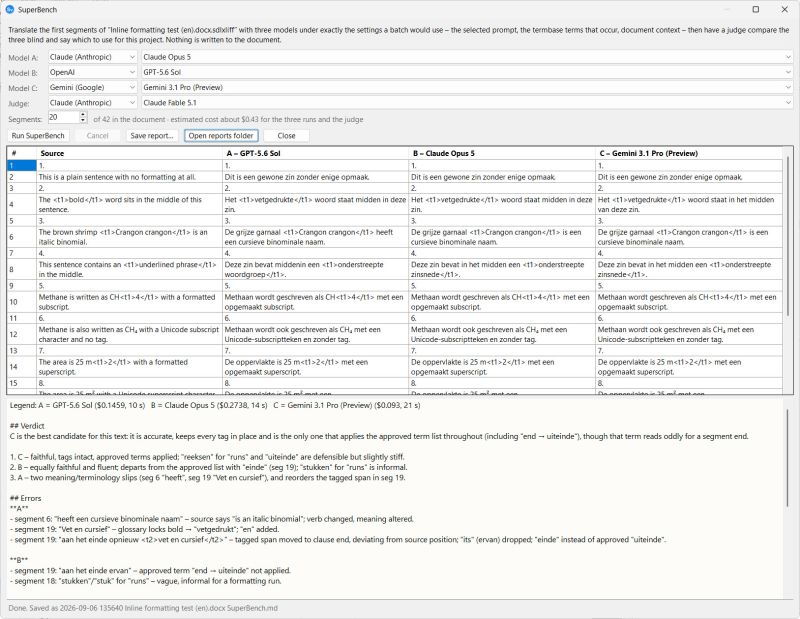
Here's what Supervertaler for Trados currently supports:
Cloud models (your own API key; you pay the provider directly)
• Anthropic: Claude Opus 5.5, Claude Sonnet 5.5, Claude Fable 5.1, Claude Haiku 4.5
• OpenAI: GPT-5.6 Sol, GPT-5.6 Terra, GPT-5.6 Luna, GPT-5.4 Mini
• Google: Gemini 3.1 Pro, Gemini 3.8 Flash, Gemini 3.5 Flash-Lite
• Mistral AI (a French company, for anyone who prefers a European provider): Mistral Large, Mistral Small
• DeepSeek: DeepSeek V4 Pro, DeepSeek V4 Flash
• xAI: Grok 4.3
• OpenRouter: one API key for hundreds of models, from all of the above and many others, including open models such as Gemma 4, Qwen and DeepSeek
Local models (free, and your text never leaves your computer)
• Ollama: TranslateGemma 12B and 4B, Qwen 3 14B, Aya Expanse 8B, or any other model you've downloaded. Ollama can also run on another machine on your network, such as a PC with a bigger GPU.
• Any OpenAI-compatible server, such as LM Studio, through the Custom provider
Most of these are in the drop-down menus, and you can use any other model a provider offers by typing its name into the Model ID field in AI Settings.
Incidentally, I just released Supervertaler for memoQ a few days ago, see: https://supervertaler.com/memoq/
Supervertaler for memoQ is not quite as feature-rich as Supervertaler for Trados, but I'm getting there...
Michael
---
PS: I made a very short screencast a while ago, showing the model selector in Supervertaler for Trados. Note that the models shown are now outdated, but the basic structure is still the same: https://www.youtube.com/watch?v=0CuCGRvqiEQ ("Choose from dozens of LLMs in Supervertaler for Trados").
| | | | Mohamed Zeid
USA
Local time: 06:48
angielski > arabski
+ ...
NOWY TEMAT
Li-Hsiang Hsu wrote:
Wow, Supervertaler has a serious competitor! 😂
Ollama seems to be running very fast on your PC. Is it Ollama Cloud? I use Ollama locally on my gamer PC, which has a decent GPU, but it struggles with newer models like Gemma 4 and Qwen.
Hi Li-Hsian,
I use local Ollama. TranslateGemma:12b is really amazing, and fast. I have Geforce RTX 4080, 12GB, and I can run "gemma-4-26b-a4b-it", the quantized version, with a decent speed, and great instruction-following peformance. The main benefit to me is actually privacy, speed, and the glossary functionality is simply amazing if you have a glossary ready.
| | | | To report site rules violations or get help, contact a site moderator: You can also contact site staff by submitting a support request » Using LLMs Directly in Trados Studio: A Plugin Worth Exploring | Trados Business Manager Lite | Create customer quotes and invoices from within Trados Studio
Trados Business Manager Lite helps to simplify and speed up some of the daily tasks, such as invoicing and reporting, associated with running your freelance translation business.
More info » |
| | LinguaCore | AI Translation at Your Fingertips
The underlying LLM technology of LinguaCore offers AI translations of unprecedented quality. Quick and simple. Add a human linguistic review at the end for expert-level quality at a fraction of the cost and time.
More info » |
|
| | | | X Sign in to your ProZ.com account... | | | | | |




 Login to reply/comment
  Translation news
